On many CAES and UGA Extension lab and program websites, our researchers and specialists add publication lists. Here are instructions to add a list style with a hanging indent to meet APA Style and WCAG 2.0 Level AA guidelines on your WordPress site.
Setting up a publications list
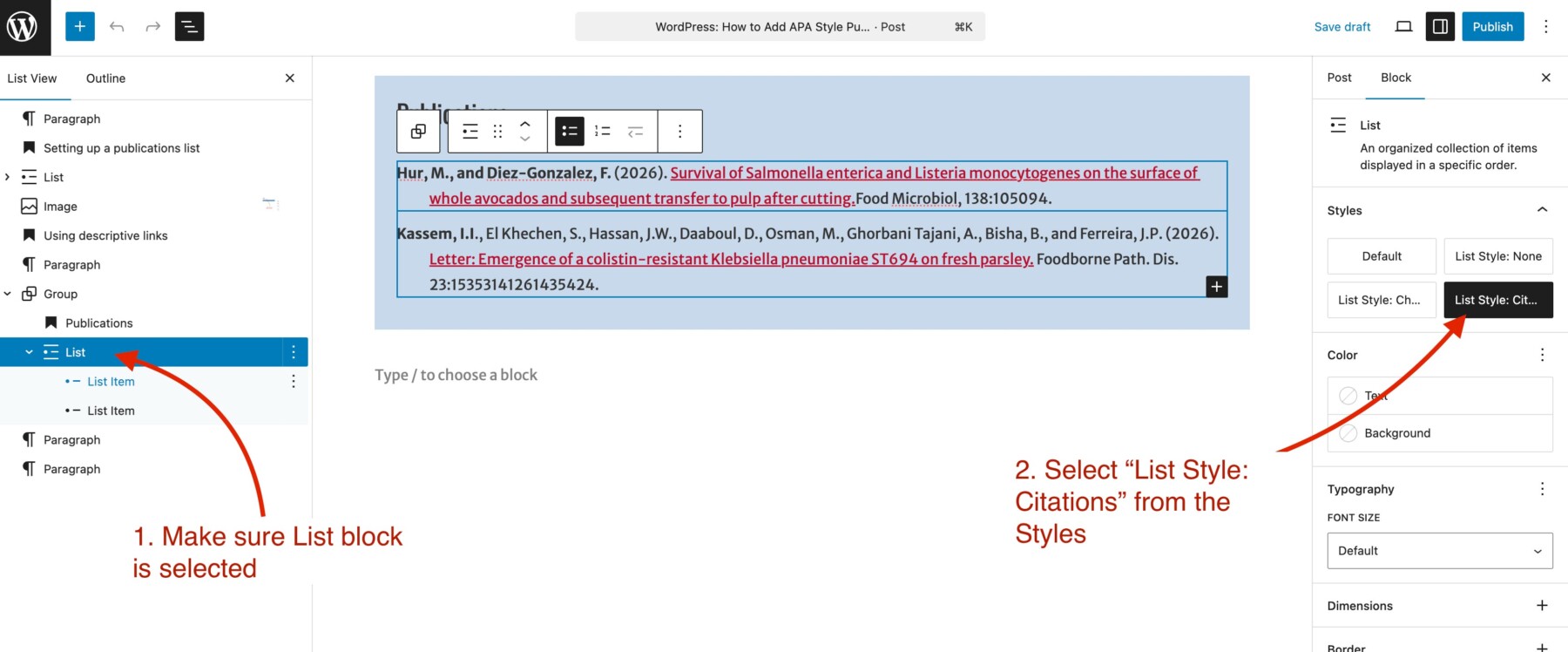
- Add a List block on the page
- Add your references
- In the left panel, Document Overview – List View, select the List block
- In the right panel, Settings – Block view, select List Style: Citation
Using descriptive links
You don’t need to add active links, but if you do, linking the title is best practice to make it easier for screen readers. Link the title of the work to the work’s URL or DOI, as in the following examples:
Publications
- Hur, M., and Diez-Gonzalez, F. (2026). Survival of Salmonella enterica and Listeria monocytogenes on the surface of whole avocados and subsequent transfer to pulp after cutting. Food Microbiol, 138:105094.
- Kassem, I.I., El Khechen, S., Hassan, J.W., Daaboul, D., Osman, M., Ghorbani Tajani, A., Bisha, B., and Ferreira, J.P. (2026). Letter: Emergence of a colistin-resistant Klebsiella pneumoniae ST694 on fresh parsley. Foodborne Path. Dis. 23:15353141261435424.
If you need assistance setting up a List block on a WordPress page or post, contact the web support team for help.
